
AI agents like OpenClaw is powerful but is it actually right for you?
Considerations to decide if you need an AI agent and whether you would build one.
Built for small screens — bite-size cards and quick checks instead of long scrolling.
Try it interactiveSection 1 · Introduction & Current Adoption
Picture an AI that knows your schedule, your habits, your ongoing projects and you just talk to it, in WhatsApp, Telegram, or Slack, the way you'd talk to someone who already knows you. No app to open. No dashboard to learn. You type a message, and it just goes and does things checks something, sends something, remembers something for later. That feels like magic the first time you see it.
Too good to be true? That's exactly the question this course is built to answer. This course helps you understand, realistically, where things actually are right now not the pitch, not the panic, just where we are.
You may have heard the name "OpenClaw," or an earlier name it used. It went viral fast. It became one of the fastest-growing open-source projects in GitHub's history, in just a few weeks. Soon after, it became the center of the first major AI agent security crisis of 2026.
Six months on, growth has not slowed down, even with the security crisis being real and widely reported. This tells us something important: enough people find the benefit strong enough that they choose to manage the risk, instead of walking away.
More power means more responsibility, not less. That is the shape of the choice this course is built around.
Who this course is for: you already understand the basic idea of an AI agent. This course does not require any technical background as it is entirely about helping you decide, clearly and honestly.
Section 2 · OpenClaw Overview

In plain words: OpenClaw is an open-source system for running AI agents that can use tools, interact with your files and apps, and carry out multi-step tasks on your behalf. While you can interact with OpenClaw through messaging apps, it also provides a browser-based Control UI dashboard and administrative interfaces for monitoring and managing your agent.
Why this matters right now, specifically: this is early days for this whole category. The idea of a single, always-on personal AI that manages your digital life instead of just answering questions has only become realistic in the last year or so. You are looking at the beginning of something, not a mature, settled product. That has real consequences worth naming:
It is broad, and a little clunky in places. It tries to do a lot messaging, files, code, scheduling and not every part of that is equally polished yet.
Expect some tinkering. This is not a finished consumer app where every path has been smoothed out. You will hit rough edges.
This is normal for a new category, not a sign something is wrong. Being honest about this now means you won't be surprised by it later.
What makes it different from a normal chatbot: a chatbot answers when you ask a question. OpenClaw can take action by itself reading and writing files, running code, browsing the web, managing your calendar, sending messages, running tasks on a schedule. A language model sits behind it and makes the decisions. It runs on a computer you control, not a company's cloud service.
Section 3 · Cost Overview

OpenClaw itself is free and open-source. What you pay for is compute/hosting (if you choose to run it separately) and API usage for the underlying language model. Running OpenClaw typically incurs two main ongoing costs: host infrastructure (around $5–$20/month for a standard VPS) and model API calls (which vary based on workload and model provider, often bringing total basic operation to around $10–$30/month).
Section 4 · Core Capabilities & Use Cases

Here is the question, with no sales pitch: do you value the benefit enough to accept a risk you can manage, but not remove?
Three examples people actually report using, day to day:
A morning briefing, done for you. Overnight, the agent checks the news sources you actually trust, your calendar, and your task list and sends you one message when you wake up.
Reminders that really happen. Not a notification you swipe away a message that keeps showing up until you actually deal with it.
Scattered notes turned into something usable. Drop a URL, a screenshot, or a quick thought into the chat. By evening, it has been organized so you can ask "what have I saved about this?" later and get a real answer.
The benefit is real and specific. The risk is just as real. This course does not try to talk you into this, or out of it it asks you to weigh a real trade.
Section 5 · Key Operational Considerations

You do not need technical details to understand the shape of the risk. In plain terms:
A setup left open by mistake can be found and misused by strangers. Like leaving a door unlocked this software has been found running with no protection at all, because it was set up carelessly, not because anyone broke in cleverly.
Add-ons from unknown sources can be harmful. The same way you would not install software from a stranger onto your main computer, unreviewed add-ons for this kind of agent have been found to contain harmful code.
Because it has broad access, a mistake matters more here than in a simple app. This agent can touch your files, your accounts, and your schedule exactly what makes it useful, and exactly why a problem here is more serious.
None of this means the risk is unmanageable. It means it is real, and worth taking seriously.
Section 6 · Is OpenClaw Right for You? (The Decision & Setup Effort)

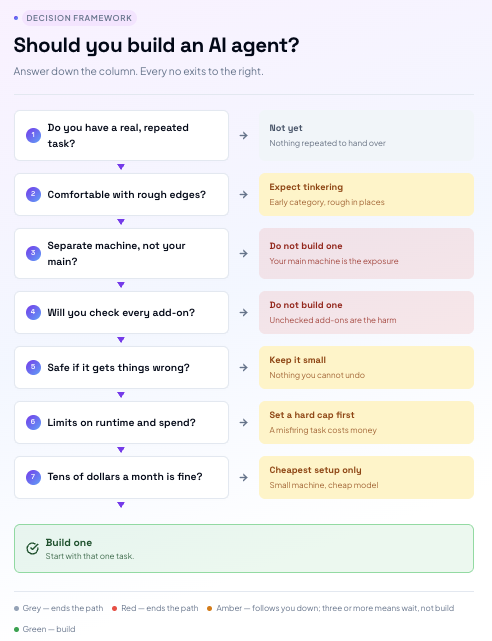
This is not a lecture. It is a real set of questions. The main idea behind them: While OpenClaw is becoming more accessible, setting it up securely still requires comfort with basic system administration. If you do not have a technical or security background, it is recommended to have a technically experienced colleague or friend assist during setup. But before that, answer this to yourself:
1/ Do I have a real, repeated task this would actually solve? Not "this looks cool" a specific, real, repeated task.
2/ Am I comfortable with something new, broad, and occasionally clunky? This is early in this category's life. If you want a smooth, finished experience, that expectation itself is worth checking now.
3/ Am I willing to isolate it from my main computer and limit what it can access? The single most important safety step available, and it does take some extra effort.
4/ Am I willing to check what I install, instead of just clicking through? Unreviewed add-ons are exactly where the harm in Section 5 comes from.
5/ Can I handle it being wrong sometimes, without real harm? Start with something small and safe to undo.
6/ Am I willing to set real limits on how much this can run and spend? A task that misfires can cost more than expected.
7/ Am I comfortable spending roughly $10–$30 per month on infrastructure and AI model access? If you answered yes across these, and it still looks worth it, it likely is.
Here's a decision tree to help you visualise this:
Before any specific choice, a gut check. Building this involves ongoing pieces to manage: a separate machine, a model connection, updates over time. It's closer to keeping a small aquarium than assembling flat-pack furniture. Not a one-time build you finish and forget. Something you maintain.
If that sounds like more commitment than you expected, that's useful to know now. If it still sounds worth it, here are the choices that actually matter.
Section 7 · Which AI Model - Cloud or Local?

Your agent needs to connect to a language model (an AI model, the same kind of technology behind Anthropic or OpenAI) to actually work. This is the part that interprets what you ask it to do, decides what action to take, drives the agent's behavior, and writes the responses that come back to you. OpenClaw is only the framework around it. The language model is what actually does the thinking.
Cloud AI mode: For a first build, connect to a cloud model instead. While OpenAI and Anthropic cloud models are popular choices, MiniMax for example is a low-cost option, as it offers both a paid cloud service and open-weight models you can run yourself.
Provider pricing varies and changes over time. For example, MiniMax currently rates around $0.30/M input tokens and $1.20/M output tokens for its M2.7 model (with comparable discounted rates for M3 at specific context windows). Monthly model spending depends entirely on context window sizes, prompt length, and activity frequency rather than fixed token limits.
Local AI model: Alternatively, you can download an open-weight model like Meta Llama and run it on own rented machine, running the model yourself. Local inference can increase data privacy and operational control. However, it does not guarantee absolute privacy if your agent connects to external cloud channels or web services. Additionally, running local models requires dedicated hardware or GPU compute, which can cost significantly more upfront or in power than cloud API consumption.
None of this makes local AI models a bad choice forever. It makes them a bad first choice. Hardware requirements scale directly with parameter size and quantization; larger local models require substantially higher RAM and VRAM capacity. Always check the system requirements of the specific model and quantization level you plan to run.
Section 8 · Where Should You Run It? (Infrastructure & Hosting)
Two options for the server itself, and they feel very different to actually use.
AWS (Amazon Web Services): EC2 - is the most powerful and most flexible option, and it's also what most official setup guides assume you're using. AWS offers credits and free tier allocations for newer eligible accounts (which can offset basic EC2 costs for up to six months depending on account type and usage limits), though setup and billing configuration are more complex.
The eventual cost: it bills by the hour, which sounds precise but means the bill can surprise you if something runs longer than expected and getting it configured correctly the first time (security settings, storage, network access) takes patience. It's powerful, but it was not built with a beginner's first afternoon in mind.
One AWS-specific thing worth knowing before you start: your main account login has full admin access to everything, including your billing. Using it for everyday setup work is a common beginner habit, and a risk if that login is ever compromised. AWS lets you create a separate, limited-permission user for actual day-to-day work instead set one up before you do anything else, and keep the root login for account-level tasks only.
Hostinger takes the opposite approach: a fixed, predictable monthly price typically around $5 to $20 depending on the plan with backups, basic security, and support bundled in from the start. It's noticeably simpler to get a first server running on, at the cost of some of the flexibility and scale AWS offers.
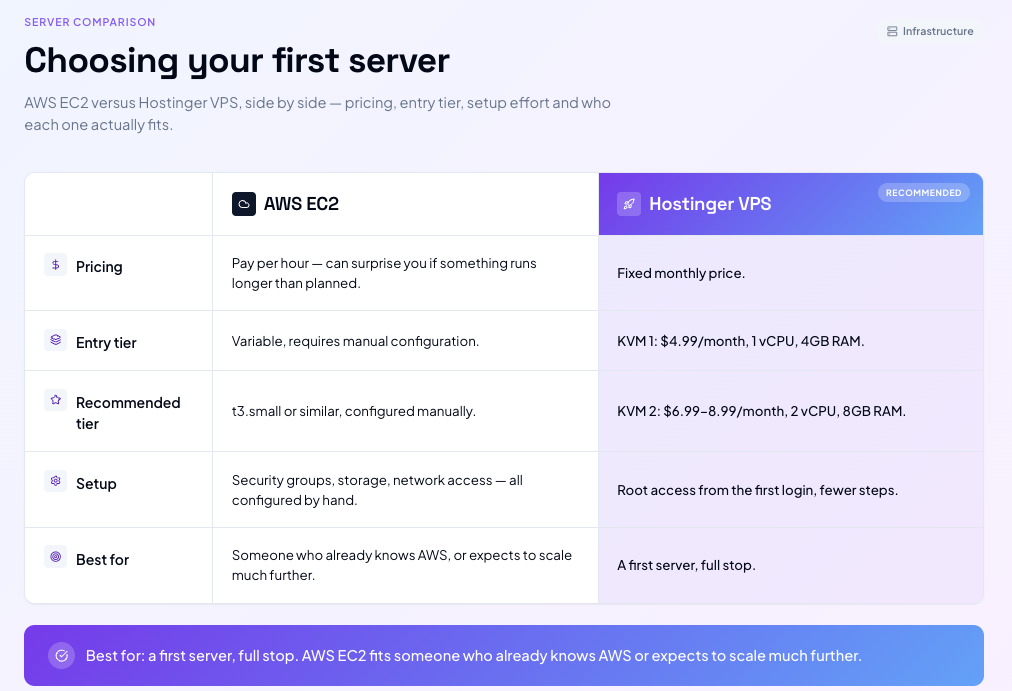
For beginners, a fixed-price managed VPS may be simpler to manage than AWS's configurable billing model; Hostinger is one standard example of this approach. The predictable price and simpler setup remove a lot of the friction that has nothing to do with actually learning OpenClaw. Move to AWS later if you outgrow it for a single personal agent, most people won't need to.
Section 9 · Security, Isolation, and Sandboxing

Whichever server and model you choose, follow these 3 security concepts:
System Isolation: Keep the agent environment separated from your personal or primary work environment.
Least Privilege: Limit tool execution permissions, folder access, and API keys to only what the agent strictly needs.
Sandboxing: Use OpenClaw’s built-in container/sandboxing controls and explicit tool/workspace permission flags.
Look for active maintenance and documented security disclosures, but do not treat community popularity as a guarantee of security.
Section 10 · What the actual setup looks like, and where to start
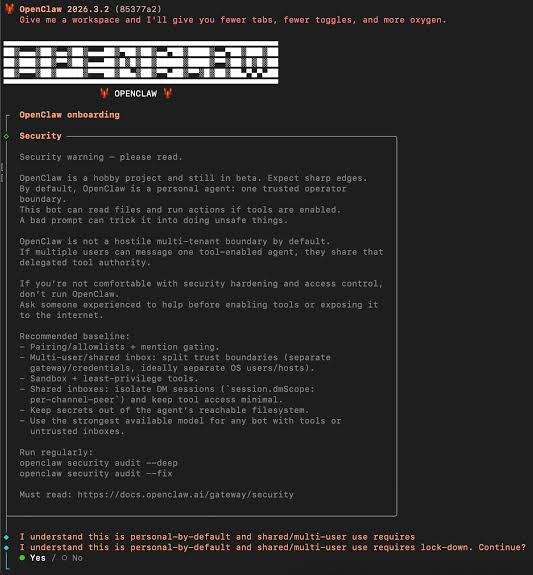
It will not look like installing a normal app. Expect a written guide asking you to type commands into a plain text window normal for this kind of software, even if it looks intimidating the first time.
Where to actually go: Here's the OpenClaw's official GitHub repository and its own setup documentation directly, rather than a secondhand tutorial. This software updates often, and updates are frequently tied to fixing safety issues the official source is where you get the current, safest version of the instructions, not a copy that might already be out of date.
Our take: budget a relaxed afternoon for your first attempt, not a rushed ten minutes. No technical background is needed to decide whether OpenClaw is right for you, but setup is easier with some help.
A concrete starting combination, if you want one recommendation rather than an open menu: Hostinger for the server, a cloud AI model to begin with, and Telegram as your interface.
Telegram's bot setup is generally lightweight and quick to configure, whereas WhatsApp's business integrations can require additional account verification and platform setup.
Simple, cheap to start, and gets you to a working agent with the fewest new things to learn at once.
A note on the repository you're about to visit: OpenClaw is an open-source project maintained outside of Campus. We point to it because it's the best available source for current setup instructions, not because we control or vouch for its code, its maintainers, or its future direction. Use it at your own risk.
Section 11 · Many ways to go from here
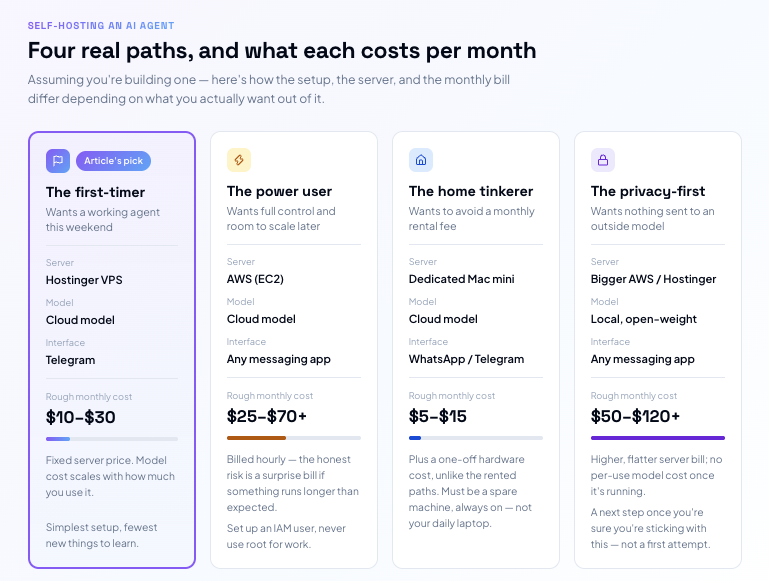
Once your first agent is working, there's a lot of room to change any piece of it a different messaging app, a different cloud provider, a different model, or eventually a local model if privacy or cost at scale becomes the priority.
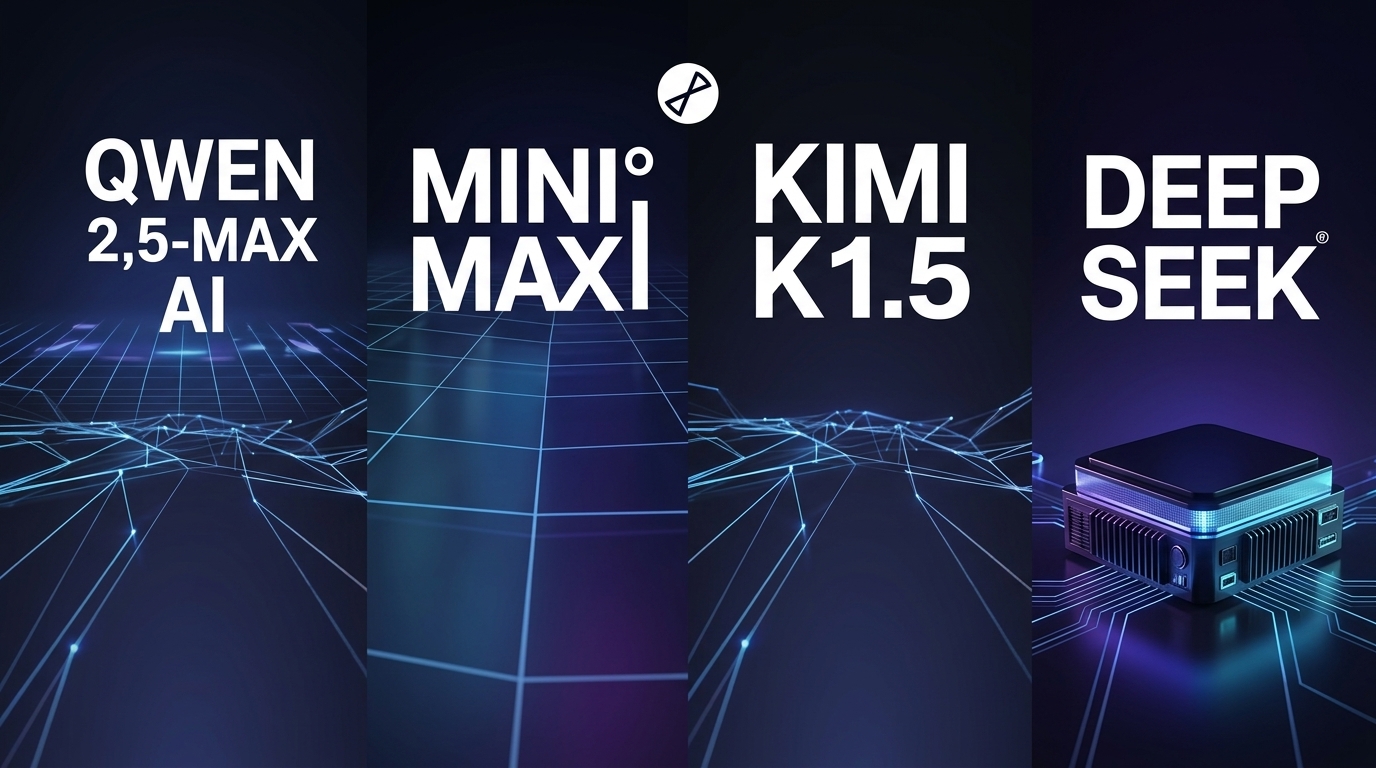
If you're building from somewhere in Asia, there's an extra reason to look at open-weight models specifically. Locally deployable open-weight models can reduce reliance on overseas hosted AI services, subject to local infrastructure capability and regulatory requirements. Open-weight models also typically cost a fraction of a premium closed model.
A few current options worth knowing by name: MiniMax (a strong, low-cost, well-rounded default), Kimi (built for long, stable sessions and large amounts of context), and Qwen (the widest range of model sizes and the most flexible license terms). This space moves fast check current benchmarks and pricing before committing.
Disclaimer: This course reflects our own perspective, based on our own testing and research at the time it was written. Prices for third-party tools and services mentioned throughout this course are accurate as of October 2026 and are subject to change. This course is not affiliated with, endorsed by, or a substitute for OpenClaw's official documentation. Open-source agent software carries inherent risks, including but not limited to security vulnerabilities, unexpected costs, data loss, and software that changes or breaks without notice. Nothing here constitutes professional security, legal, or financial advice. You assume all risks associated with building, deploying, and running this software; use everything provided in this course entirely at your own risk.
What you now know
1. Scope & Function: OpenClaw is a powerful open-source agent runtime capable of multi-step task execution via messaging apps, local integrations, and a web-based Control UI.
2. Infrastructure: Dedicated environment separation (such as a managed VPS) is the recommended path for an always-on agent to maintain uptime and isolation.
3. Cost Factors: Ongoing costs combine infrastructure hosting ($5–$20/month) and AI model consumption, which varies based on model choice and usage volume.
4. Security First: Safe deployment depends on strict environment isolation, least privilege permissions, and enabling built-in sandboxing rather than attempting manual source code audits.
5. Model Versatility: You can drive OpenClaw using leading cloud APIs (OpenAI, Anthropic, MiniMax) or self-hosted open-weight models, balancing performance, budget, and local deployment constraints.