
Meet Your New Work Buddy: Put Your WorkBuddy AI Agent to Work
WorkBuddy, a new 'Workplace AI Agent' developed by Tencent Cloud, has been all the rage these days! In this course, learn to navigate the basics of using a WorkBuddy AI Agent in your usual daily workflows.
Built for small screens — bite-size cards and quick checks instead of long scrolling.
Try it interactiveChapter 1: So, What Can Your New Work Buddy Actually Do?
First of all, What is WorkBuddy?
WorkBuddy is a full-scenario desktop AI agent and multi-agent workspace developed by Tencent Cloud, designed to function as an autonomous "AI employee" for everyday office professionals. Built by the Tencent Cloud CodeBuddy team (the creators of Tencent’s AI coding assistant) and powered by Tencent’s Hunyuan foundation models, the tool has been officially rolled out to global markets in 2026 - the international version was strategically adapted for Western workflows, featuring native integrations with Slack, Discord, and Telegram. The global version of WorkBuddy is what we’ll be focusing on in our course.
An introduction of this first chapter:
Got a half-finished client update, a folder full of reference files, and fifteen minutes before your next call? That is the kind of work where an AI agent like WorkBuddy can help! You bring the context. WorkBuddy plans the steps, works with the material you authorize, and gives you something you can review instead of a blank page.
What WorkBuddy Does:
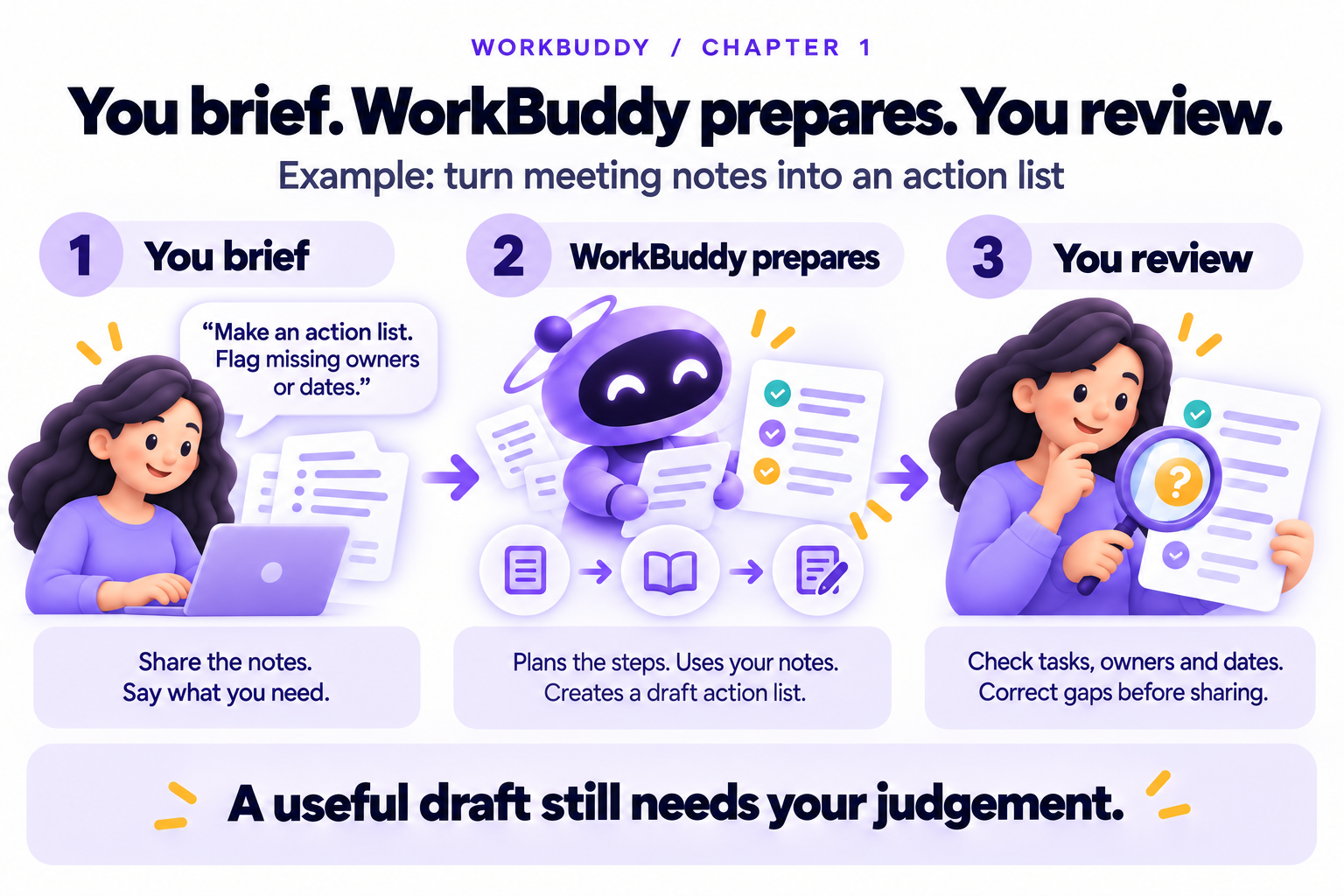
As mentioned earlier, WorkBuddy is positioned as an AI agent for everyday office work. The important word here is agent. A normal chat tool can suggest what you might do. An agent is designed to take a task, break it into steps, use available tools or files, and return a result you can inspect.
That does not mean you stop thinking. The best mental model is not a magic assistant, think of it like a “capable junior colleague”. You give it a clear brief, share the right material, then review the result for accuracy, tone, missing context, and risk.
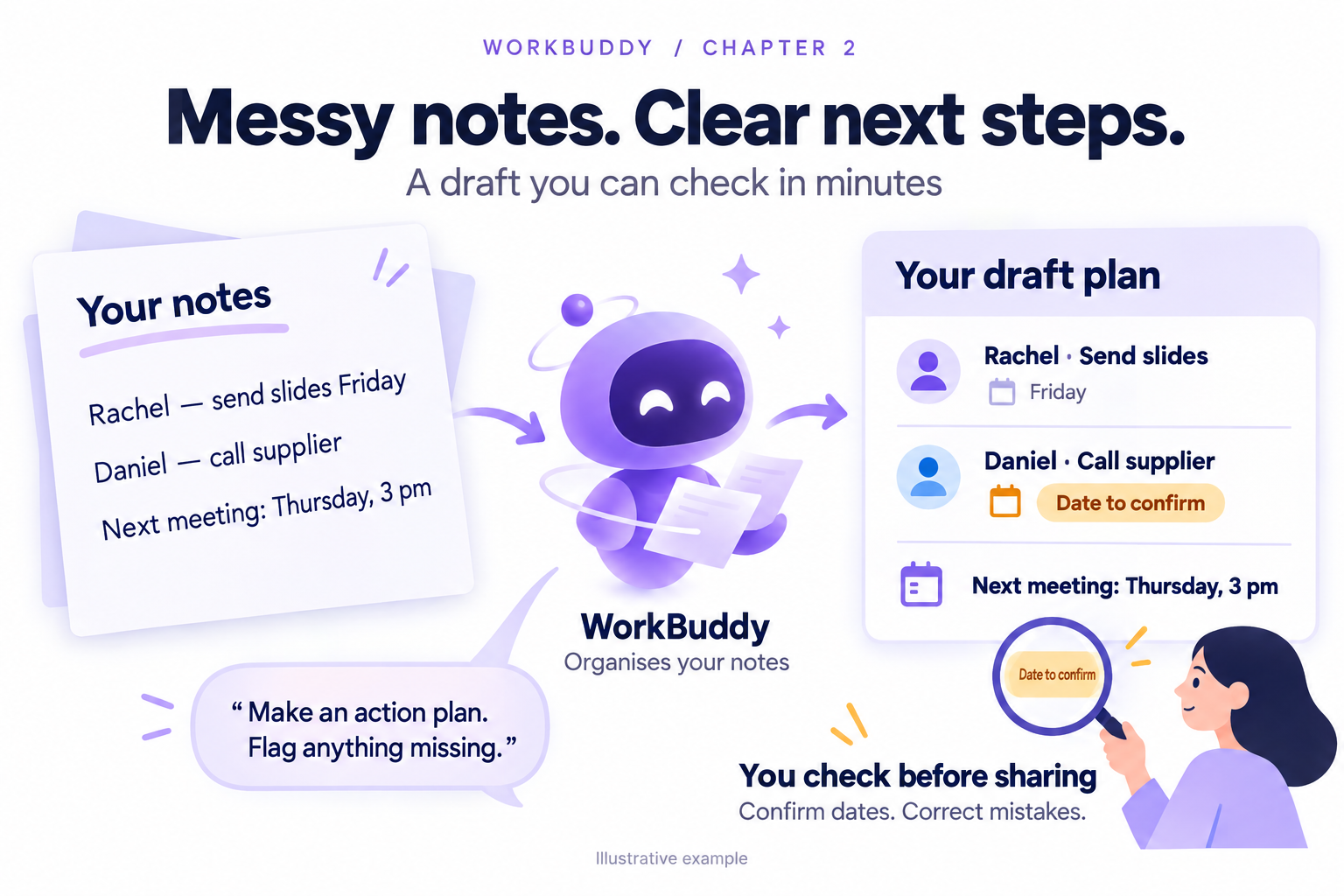
A simple workplace task might look like this: you paste meeting notes and ask for an action plan. WorkBuddy reads the notes, identifies owners and deadlines, separates decisions from open questions, and formats the result. You then check whether it matches what was actually agreed.
WorkBuddy's features include natural-language task requests, autonomous planning and execution, document generation, data analysis, presentation or report generation, deep research, email or weekly report drafting, and batch file processing.
Throughout this course, there are optional activities, mostly "Prompt Activities" which we've prepared for you to try with your WorkBuddy agent, using fictional work scenarios. This will give you a better on-hands grasp of WorkBuddy, for this to work you'll have to first Sign Up for a WorkBuddy account and install the program on your device.
Already signed up for WorkBuddy? Great - let's move on to Chapter 2!
Chapter 2: Your First Small Win
Now you know the basics of WorkBuddy, let’s move on to your first task for your WorkBuddy Agent. A good first task is small, messy, and familiar. Meeting notes are a good starting point - they are rarely sensitive in the training room, easy to verify, and the improvement is obvious within minutes. For practice, use made-up notes, because real ones often contain confidential details.
How This First Task Works:
First of all, start with a low-risk task. Do not begin with a board memo, legal clause, or anything that could create trouble if misunderstood. Begin with something where you yourself can quickly spot errors.
The goal is not to get a perfect document on the first try. The goal is to experience the basic loop: brief, receive, review, refine. Once you see that loop, WorkBuddy starts to feel less like a chatbot and more like a work surface.
For this activity, the output should be practical. A useful action plan has owners, tasks, dates, and open questions. If the source notes are unclear, the output should say so rather than invent certainty.
Keep the prompt short but specific. You are not writing a speech - you are giving instructions.
Instructions
Send this fictional scenario and sample meeting notes as a prompt for your WorkBuddy agent. Feel free to change these 'example' scenarios and meeting notes to something more realistic to you and your role at your company!
Copy and Paste Prompt Activity - Paste the below into WorkBuddy:
I have rough meeting notes below. Turn them into a clear action plan with three sections: Decisions, Action items, and Open questions. If an owner or deadline is missing, mark it as 'Needs confirmation' rather than guessing. Use a concise professional tone
My notes: March marketing sync. Rachel says landing page fix is nearly done, probably Friday. Daniel will follow up with the Hong Kong, China supplier about new samples. Serena will draft the Singapore launch email by Wednesday. Someone must update the CRM with last week's leads. Budget for Q2 campaign needs discussion next week. Next meeting moved to Thursday at 3 PM.
Chapter 3: Give It a Brief It Can Work With
The next crucial skill you’ll need when interacting with AI Agents like WorkBuddy is briefing. Similar to good prompting skills, a good brief essentially makes your agent understand your task better and allows less room for hallucination and errors.
If you have ever said 'Can you make this better?' to an AI Agent and received something bland, the problem may not be the tool. It may be the brief. Busy people often under-brief because they already know the context in their own heads.
How to Best Brief WorkBuddy:
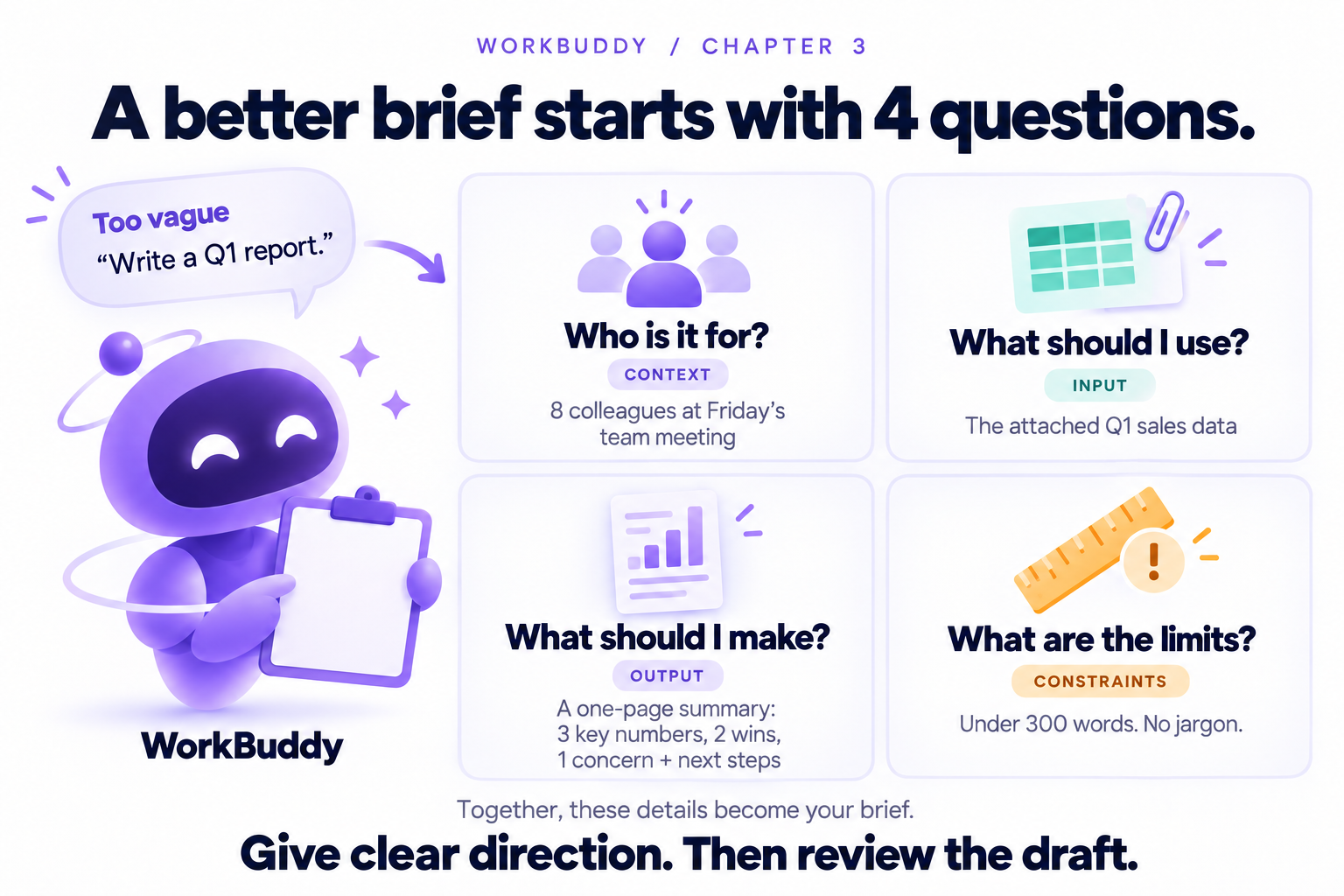
A strong brief has four parts: context, input, output, and constraints. Context explains who the work is for and why it matters. Input tells WorkBuddy what to use. Output specifies the format. Constraints set limits on tone, length, style, sources, or risk.
You do not need a long prompt. In fact, the best prompt is often short and structured. The difference is that it answers the questions a colleague would ask before starting.
A vague prompt says: 'Write a report about Q1 performance.' A stronger prompt says: 'I am presenting at a Friday team meeting to 8 colleagues. Use the attached Q1 sales data. Create a one-page summary with 3 headline numbers, 2 wins, 1 concern, and next steps. Keep it under 300 words and avoid jargon.'
Notice what changed. The stronger prompt tells WorkBuddy the audience, the source material, the desired shape, and the boundaries. That means the first draft is more likely to land close to what you need.
Instructions
Learn to rewrite this vague prompt into a stronger brief: 'Make a LinkedIn post about our new service.' Below are two different prompts, use both in WorkBuddy and compare the results, you'll see why prompting and briefing are crucial skills for quality AI agent output.
Weak prompt - copy and paste into WorkBuddy
We are a small HR consultancy in Singapore, draft me a hiring post for our new managers.
Stronger prompt - copy and paste into WorkBuddy
We are a small HR consultancy in Singapore. The audience is SME founders who are hiring their first managers. Please draft a social media post for LinkedIn. The post should be practical, under 180 words, and should invite readers to download a checklist.
Chapter 4: Try It on Work You Actually Have
Once the first small task works, move to something you already do every week. The best candidate is a work-related task that is repeatable, has a clear output, and usually takes you longer than it should.
Three Practical Workflows:
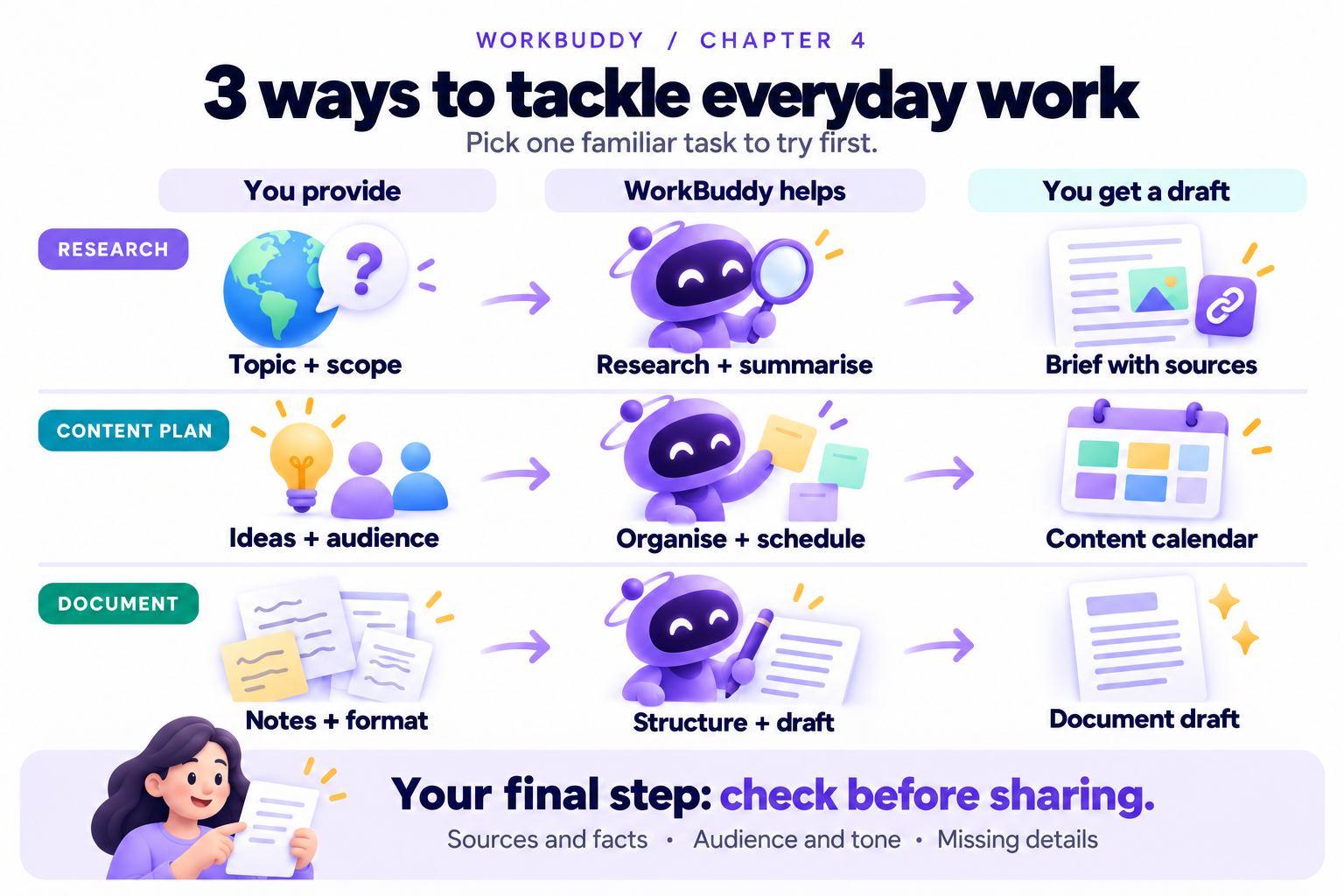
WorkBuddy is a good fit when the work has multiple steps but the goal is clear. It can research a topic and return a structured brief. It can turn rough ideas into a content plan. It can create a polished document from rough material. These map to some of WorkBuddy's capabilities, which include deep research, document generation, and report generation.
The key is to ask for a deliverable, not just advice. Instead of 'What should we post?', ask for a table of post ideas with audience, hook, message, and next step. Instead of 'Research this market', ask for a one-page brief with scope, sources, risks, and open questions.
Open the WorkBuddy task area, and attach or paste only material you are allowed to use.
Below are three workflows you can copy. Start with fictional material, then you can try adapting one to a real task!
Instructions
We've prepared some useful 'Workflow' prompts for you, you can also easily adapt these to suit various tasks in your workplace.
Workflow 1: Research brief
I need a short research brief on [topic] for [audience]. Focus on [market, segment, or question]. Use current publicly available information where possible. Return: 1) five bullet summary, 2) what is changing, 3) three practical implications, 4) risks or unknowns, 5) source links. If you cannot verify something, say so.
Workflow 2: Content plan
Create a two-week LinkedIn content plan for [company/team]. Audience: [who]. Goal: [goal]. Tone: [tone]. Output as a table with Date, Post idea, Hook, Main message, Format, and Call to action. Avoid hype and make each idea specific enough to draft from.
Workflow 3: Polished document
Turn the rough notes below into a polished [document type]. Audience: [reader]. Purpose: [decision, update, follow-up]. Keep the structure clear, use headings, and flag missing information in a short 'Needs confirmation' section.
[Rough notes here]
Chapter 5: What to do if the First Draft from WorkBuddy Misses the Mark
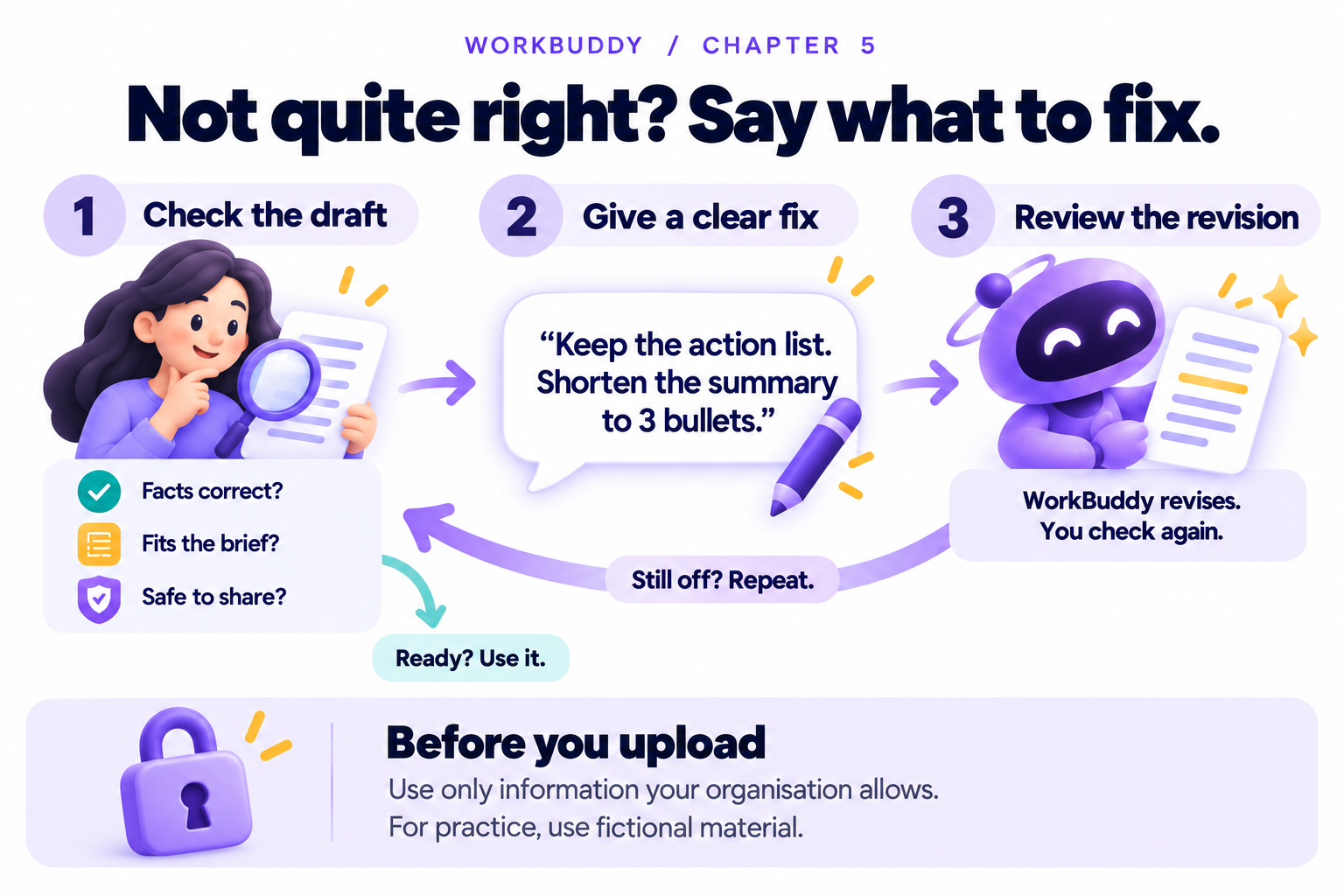
Sometimes the first result generated by an AI Agent is close but not quite right. Maybe it sounds too generic, maybe it missed the audience, or maybe it made a confident claim you do not recognize. That is totally normal. The useful skill is knowing what to say next so you can properly guide your WorkBuddy Agent.
How to Review and Revise:
Do not respond with 'try again' unless you want another guess. Good feedback points to the exact problem. Say what is wrong, where it appears, and what a better version should do.
Watch for three common issues. First, unsupported claims: statements that sound factual but do not appear in your source material. Second, generic writing: polished lines that could belong to any company. Third, format drift: the answer ignores the table, word count, or structure you asked for.
A helpful revision message sounds like this: "Keep the action list, but shorten the summary to three bullets. Remove the phrase market-leading because we did not provide evidence. Add a Needs confirmation section for missing owners. Make the tone warmer and less corporate."
Sensitive information needs extra care. Before sharing files or pasting text, remove client names, personal data, credentials, financial details, and do check your organisation's AI and data policy before uploading anything. You can also take an extra step and read WorkBuddy's Privacy Policy to see how uploaded files are stored and used.
If in doubt, use fictional or anonymized material for practice.
Chapter 6: Build Your Own Repeatable Workflow
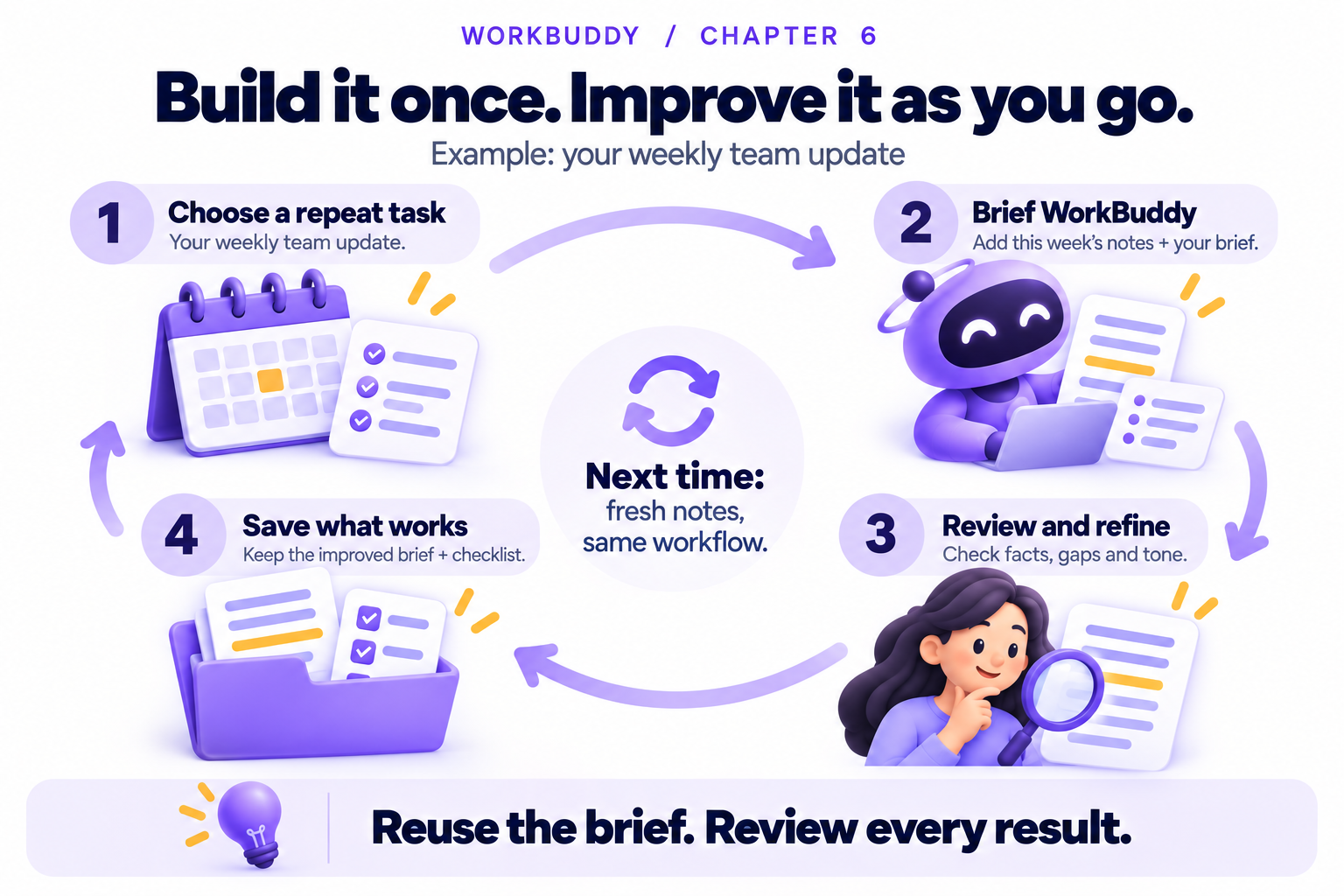
The real value appears when you stop treating each prompt as a one-off. If you write the same weekly update, content plan, research brief, or client follow-up again and again, build a reusable and practical workflow. This should help you cut out a lot of repetitive tasks in your job!
How to Make It Repeatable:
Start by choosing one task that repeats. Good candidates include weekly status updates, sales follow-up emails, campaign briefs, meeting summaries, competitor snapshots, onboarding notes, and draft presentations. Avoid tasks where the risk is high or the answer must be legally precise unless you have expert review.
Write the prompt once, run it on a small sample, review the result, then refine the prompt. Save the improved version somewhere easy to find. If WorkBuddy's memory or automation features are available in your setup, you can explore them for recurring patterns, but do not depend on them until you have verified the workflow works manually.
Your reusable workflow should include the job to be done, what material to provide, the expected output format, quality rules, and a review checklist. That checklist is what keeps speed from turning into sloppiness.
A reusable prompt is not a script you must obey forever. Treat it like a living template. Update it when your role, audience, or quality bar changes.
Instructions
Choose one recurring task from your work. Fill in the reusable workflow template that we've prepared for you below - run it with a fictional or low-risk sample first. Then you can improve the prompt based on what you had to fix. Save the final prompt in your own prompt library or team notes.
Reusable workflow template - feel free to save this for future use.
Task name: [Name of recurring task]
When I use it: [Weekly, monthly, after each meeting, before a proposal, etc.]
Context: [Audience, purpose, decision needed]
Input I will provide: [Notes, files, metrics, links, rough draft]
Output I want: [Format and sections]
Quality rules: [Tone, length, source handling, what not to invent]
Review checklist: [Facts, missing info, tone, sensitivity, final action]
Now complete this task using the input below.
[Paste input]
Nice work — you've finished the reading
Ready to lock it in? Take the quick quiz and earn your free certificate.
Back to GMAsia Campus