Design Thinking for the AI Builder
An AI assisted framework to build with the user in mind.
Built for small screens — bite-size cards and quick checks instead of long scrolling.
Try it interactiveSection 1 · What is Design Thinking?

It's a framework for thinking like a designer — not just making something pretty, but making something actually valuable for the person you're building it for.
This matters more now than it ever has. Vibe coding just handed non-coders real power — you can go from an idea to a working website or app in an afternoon, no coding background required. Building fast is genuinely cool. But speed alone doesn't answer the real question: once you put it in front of an actual person, does it mean anything to them?
That's the entire purpose of design thinking. It's not a brake on your speed. It's what keeps your next project pointed at something worth building, all the way through to delivery — the difference between shipping fast and shipping something that actually lands.
This course is for anyone about to build something, a pet project, or the next thing at work, who wants AI's speed and to stay pointed at the thing that actually matters: the person you're building for - and the framework we adopt is design thinking.
Section 2 · The framework that keeps builders from getting lost
You might start a project thinking you know what the user wants. But do you, really?
What's the actual pain point? How do you describe that pain point back to a user in a way that makes them nod, not shrug? What are the different ways you could relieve it? Is the way you picked actually the best one, and why? And now that you've built it — does it actually relieve the pain point, from the user's side, not just yours?
Sound familiar?
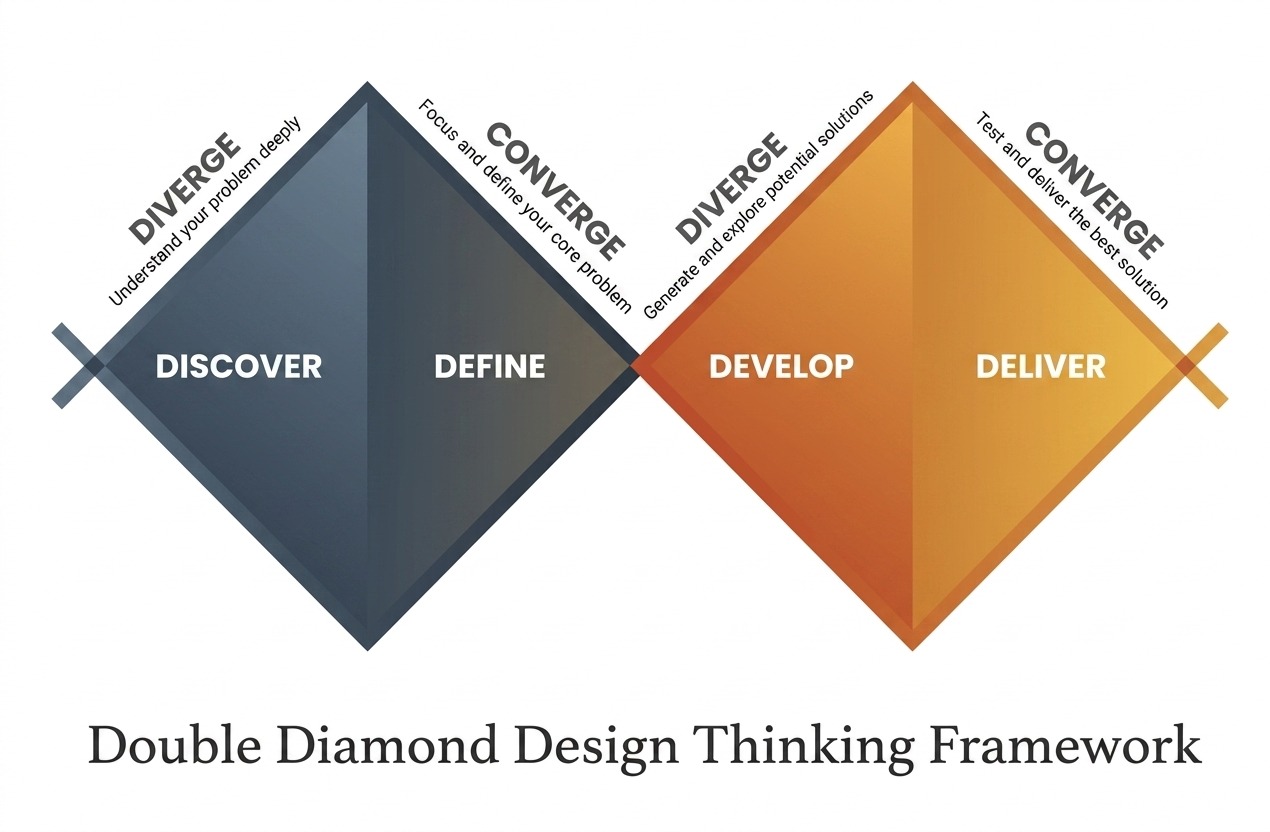
Design thinking is the framework that walks you through exactly that process, one step at a time — from discovering a problem, to defining it, to solving it. It has four phases, usually drawn as a "double diamond" — widen, narrow, widen, narrow again:
Discover — go wide. Understand the problem and the people who have it. There are usually many problems tangled together, such as, too much news, not knowing what's actually relevant or that nagging feeling of falling behind while everyone else seems to be up skilling in AI.
Define — narrow. Turn what you learned into one sharp problem statement. For one specific user type, what's the problem that hits home hard?
Develop — go wide again. Generate and shape possible solutions. This is where you get creative — what are the different ways you could actually solve the problem you just defined?
Deliver — narrow again. Decide on a solution. Build it, test it, ship it. Then ask your users: is the problem actually gone? If not quite, that's not failure — it's a sign to go back a stage.
The key thing people miss: it's not a straight line you walk once. It's a loop you keep cycling through — every version of your project should send you back to Discover with sharper questions.
Section 3 · Why AI and design thinking actually fit together

It's not a coincidence that these two work well together , there are two real reasons:
1. AI needs a human in the loop, and design thinking already runs on one. AI can generate ideas, draft personas, or summarize interviews, but none of that means anything until a human checks it against real users. Design thinking already insists on that validation step at every phase , a natural check on AI's biggest weakness: confidently generating things that sound right but aren't.
2. AI is built for divergent thinking, and design thinking needs a lot of it. The Develop phase runs on generating far more ideas than you'll ever use , exactly where solo builders bottleneck. One person brainstorming alone runs out of angles fast. AI doesn't get tired, doesn't get anchored on its first idea, and can produce volume you couldn't reach solo , raw material for you to shape, not a finished answer.
Put together: AI extends how wide you can go, and design thinking makes sure you still land somewhere real.
Section 4 · AI, applied to every turn of the loop
Now that you know what the framework is, the question is how you actually bake design thinking into your project as you build. Here's what each phase looks like once AI joins as a working partner, mapped onto the same double diamond.
Discover, supercharged. Remember, this phase is about exploring what problems a specific type of person actually faces — it might be your own experience, someone you know, or something you read about. But if you're in doubt, or can't access real users this week, this is where AI earns its keep as a rehearsal partner.
"Roleplay a [specific target user]. I'm going to interview you about [problem area] — answer as they would."
Or use a research-capable AI tool to pull existing research on your audience fast.
Define, supercharged. Say you've landed on a target user and listed out a whole set of problems they face — now it's time to laser in on the one that resonates most. Remember: you can't build a product that solves everything.
"Here are my raw notes and interview transcripts: [paste]. Cluster the recurring pain points, and draft three possible problem statements from them."
You still decide which draft is right — AI just clears the fog faster.
Develop, supercharged. With a clear problem in hand, it's time to brainstorm real solutions.
"You are a skeptical power-user of [product/idea]. Generate 15 possible solutions to [problem], including ones that seem impractical at first."
A role, a constraint, or an example pushes you past your first ten ideas into your next fifty. Then zoom out with a quick PESTLE pass (Section 9) to catch outside forces a narrow brainstorm misses.
Deliver, supercharged. Out of everything you've generated, you now have to decide which solution is actually the best. How? Set your own criteria, and score each idea against them — AI can help you do this fast. Once you've chosen, turn that rough idea into a deck, a storyboard, or a working mockup in the time it used to take to open a blank document, collapsing days of production into an afternoon. Now you're ready to put it in front of a real user.
Every phase gets faster with AI. None of them get skippable — not if you're serious about the project.
Section 5 · Where builders go wrong with AI (and how to not)

To be clear: we're not replacing real user interaction — we're speeding up everything around it, and making those actual conversations far more impactful, especially when you're stepping into a field you don't know well yet.
Speed is the trap. When every phase takes minutes instead of days, it's tempting to look for shortcuts — and three failure modes show up fast for solo builders. Keep a look out:
1. Over-reliance on instant answers. Getting a plausible answer in seconds can quietly replace the slower, harder work of actually sitting with a problem — which is often where the real insight shows up.
2. Diminished creativity. Lean on AI too much and your output starts to look like everyone else's. AI tends to reflect the average of what already exists, not the bold outlier idea.
3. Missed real-user connection. It's tempting to let an AI-simulated user stand in for a real one. It's a useful rehearsal, never a replacement — the moment you stop validating with actual people is the moment your project starts drifting from the problem it was meant to solve.
None of these mean "use AI less." They mean: stay the one steering.
Section 6 · Three habits to build in: Responsive, Relevant, Reflective
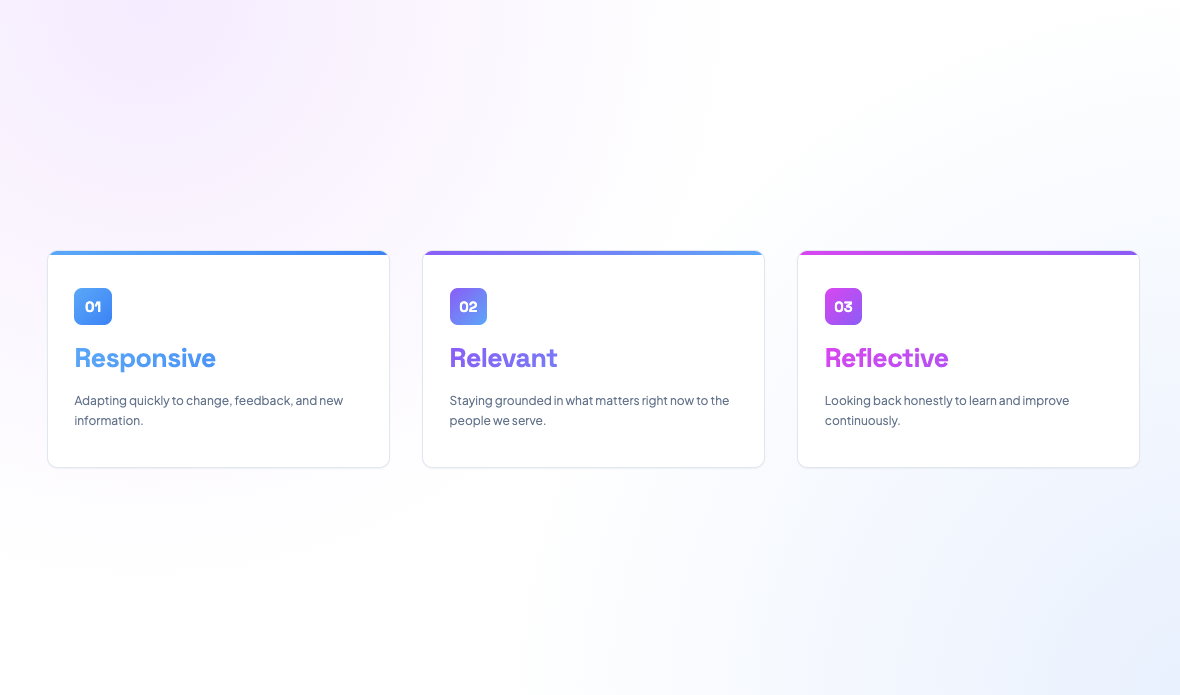
Three simple habits keep the loop honest, whatever you're building:
Be Responsive. Treat design thinking as messy and non-linear on purpose. Stay critical of AI output: check it for bias, verify it, and compare it against your own judgment rather than accepting it at face value.
Be Relevant. Anchor every AI-assisted step in a real project, not a hypothetical one. Stay aware of real-world constraints , technical, ethical, logistical , that a fast AI draft won't naturally account for.
Be Reflective. Periodically ask: what actually worked here, what didn't, and why? Your own understanding of how to work with AI should be visibly better a month from now than it is today.
Section 7 · A bonus for commercializing: PESTLE
For those still with us — here's a bonus section on mapping your solution to the bigger picture, if you're planning to commercialize your project.
Solo builders tend to zoom in on the user and stay there. Useful, but it can miss the bigger forces that will actually make or break a project once it's out in the real world.
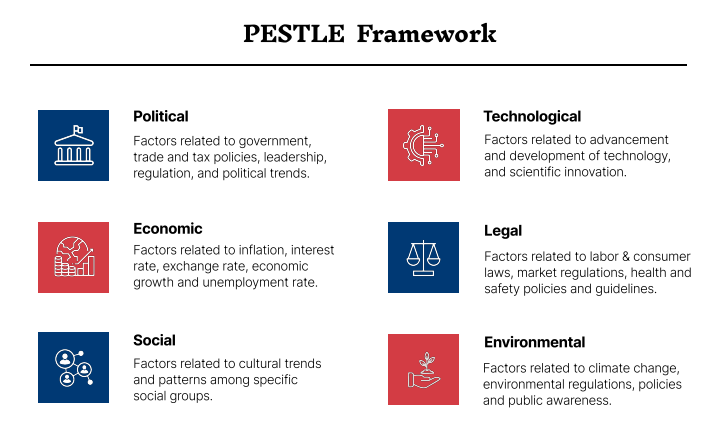
PESTLE is a fast way to check six outside factors before you commit to a direction:
Political — regulation, policy, government stance. Are there restrictions? Is what you're building aligned with where government support is heading, or working against it — which affects your odds of grants, partnerships, or synergies down the line?
Economic — cost, funding, market conditions. Is the funding environment hot right now, with real risk appetite for your kind of thesis — or conservative, meaning you may need to self-fund for longer just to keep the lights on?
Social — cultural shifts, audience behavior. Where do your users actually live — mobile or desktop, social-first or something else? This shapes real, practical decisions about format.
Technological — what's newly possible, or newly obsolete. Plenty of AI wrappers exist today only because the underlying model couldn't yet do that task itself — until it can, and the wrapper becomes irrelevant overnight.
Legal — compliance, IP, data rules. What privacy policies apply? Age restrictions? Anything touching virtual assets or regulated data?
Environmental — sustainability, resource impact. Energy use, alignment with recognized goals like the UN's, genuine impact on a real-world problem — this can matter directly for ESG-focused organizations and their appetite to engage.
You don't need a deep pass on all six. Treat it as a general health check — are you up against any real headwinds with what you're proposing? Try this prompt:
"Run this problem statement through a PESTLE lens: [paste your problem statement and solution]. Flag which 1–2 factors are actually decisive for this project — I'll only dig into those."
Section 8 · Where's your project right now?
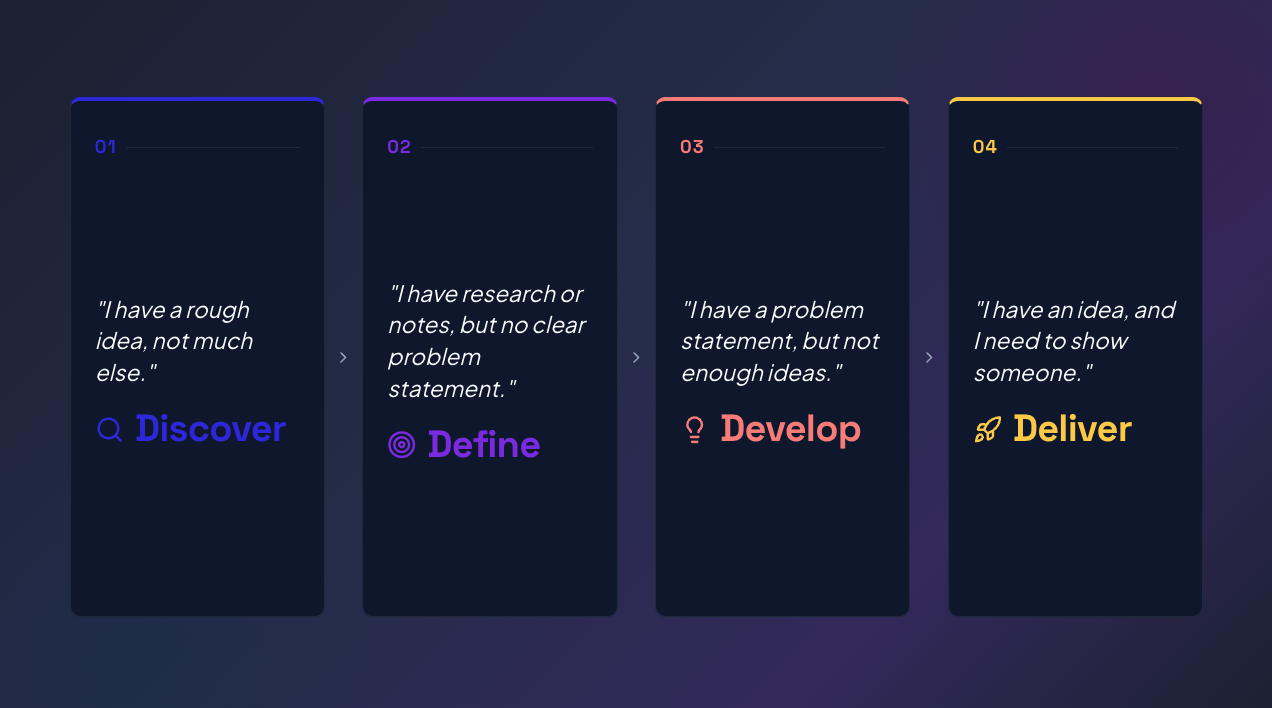
Match yourself to one of these four, and run the matching move today:
"I have a rough idea, not much else." → You're in Discover. Try this: open a chat with AI, ask it to roleplay your target user, and interview it for 10 minutes before you talk to anyone real.
"I have research or notes, but no clear problem statement." → You're in Define. Try this: paste your notes into AI and ask it to draft three possible problem statements , then pick the one that makes you uncomfortable. It's usually the sharpest.
"I have a problem statement, but not enough ideas." → You're in Develop. Try this: ask AI to generate ideas as a persona very unlike you , a skeptic, a competitor, a 10-year-old , to break your default thinking.
"I have an idea, and I need to show someone." → You're in Deliver. Try this: turn your idea into a one-slide pitch with AI, then show it to one real person before you build anything further.
Section 9 · Try this now: a starter prompt toolkit

Four moves turn a flat AI brainstorm into a genuinely useful one, take these instead of just typing "give me ideas":
1. Curate the context. Don't just state the problem, give AI the background, constraints, and stakes behind it.
2. Assign a persona. "You are a [role]. Generate solutions for [problem]." , a role sharpens AI's angle fast.
3. Encourage wild ideas. Explicitly ask for the unconventional options: "No need to be feasible , give me the fun, unexpected ones too."
4. Iterate with nudges. Treat it like a conversation, not a one-shot request: "Good, now focus more on [specific angle]."
The fastest way to frame the problem itself , the How Might We (HMW) formula:
Formula: How might we [help/enable a specific user] to [do the thing they need], given [the real constraint]?
Example: How might we help a solo founder validate a product idea in one weekend, given they have no budget for user research?
Section 10 · Keep the loop going
Design thinking with AI isn't a one-time exercise , it's the operating rhythm for building solo. Every time you ship a version, you should be back at Discover with a sharper question.
Three things to do this week:
Pick your current phase (Section 9) and run the matching micro-prompt today , not eventually, today.
Validate one AI output with a real human before you build on top of it , a persona, an idea, or a draft.
Write your own HMW statement (Section 10) for whatever you're building next, and keep it visible while you work. It's your steering wheel.
Nexa's Verdict: The framework itself predates AI by decades; what's new is how much faster each phase moves now with the help of AI.
Credits & Further Reading
This course draws on design thinking concepts developed by Dr. Jac Leung, Director of HKUST's AI Literacy Hub. His fuller framework — including classroom-oriented material this course deliberately left out — is available on the Hub's own page: AI for Design Thinking — HKUST AI Literacy Hub