
Vibe Coding 101: Build Your First Real App or Site with AI Today
You've seen it - someone in your feed built a real, working app in a weekend and posted it like it was nothing. That wasn't a flex. It's genuinely become that accessible.
Built for small screens — bite-size cards and quick checks instead of long scrolling.
Try it interactiveThe friend who built an app in a weekend

You've seen the post. Someone you know — not a developer, not technical — showing off something they built themselves. A working tool. A real link. And the caption makes it sound almost too casual for what it actually is.
Reality check: it's not a flex, and it's not an exaggeration. Describing an app in plain English and getting something real back is now genuinely accessible to someone with zero programming background. What it isn't — and this matters for the rest of this course — is magic that skips the thinking. You still need to know what to ask for, and what "done" actually means. That's everything from here.
The tools you can open right now
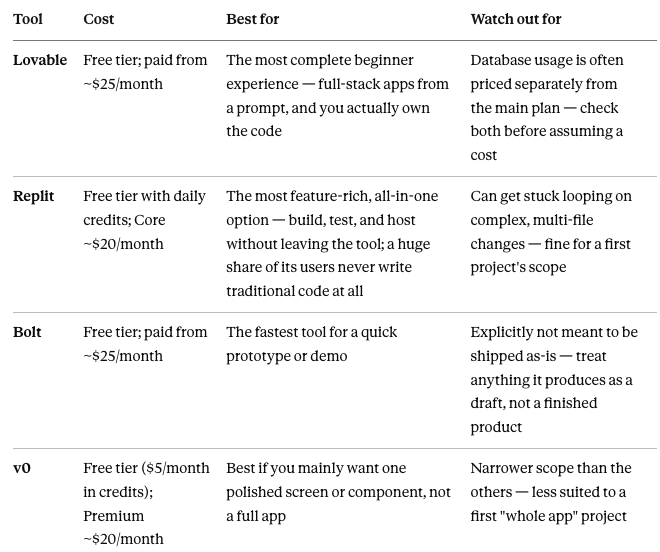
For a genuine first project: start with Lovable or Replit. Both are built to carry a true beginner all the way to something live, not just to a demo.
No tech background — here's the actual starting point

The starting point isn't a tutorial. It's one small idea, and a clear brief. Skill with a keyboard matters far less here than it used to — clarity about what you want matters far more.
The single biggest beginner mistake: starting with something ambitious. "Build me something like Instagram" fails immediately, for the same reason it would if you said it to a human developer with no other information — it isn't a project, it's a category. A working first project has one clear, nameable job. Section 5 covers exactly how to scope that.
How much this actually costs

Every major tool has a real free tier — genuinely enough to build and test a first project at zero cost. Once you outgrow that, paid tiers cluster around $20–25/month across the major tools.
The honest caution: free tiers are generous for exploring, but heavy back-and-forth iteration — asking for change after change, all in one session — can burn through daily or monthly credits faster than you'd expect. This isn't a reason to hold back; it's a reason to know it's happening rather than being surprised by it.
Scoping your first project — four questions before you write the brief

Answer these before opening any tool. They decide whether your project is a one-sitting build or an accidental multi-week one.
1. Does it need to remember anything between visits? If it only needs to work during one sitting — take an input, show a result — that's the simplest tier. If it needs to save something and still have it there next time (a list, an account, anyone's saved data), that's a real database, and a genuine jump in complexity. For a first project: pick something that doesn't need to remember anything.
2. Interactive, or just fixed content? Fixed means the page always shows the same thing — fine for an info page, not much of a "build." Interactive means it reacts to what someone types or clicks. For a first project: go interactive. It's not much harder, and it's the difference between a page and a tool.
3. Does anything need to stay private? No login, no payment details, nothing sensitive — the whole thing can run entirely in the browser, no real backend security thinking required. The moment there's a password or real user data, you've left first-project territory. For a first project: nothing private, nothing that logs anyone in.
4. Hosting — don't decide this on day one at all. Every beginner-friendly tool now gives you a working, shareable link with a single "Publish" button built in. This only becomes a separate decision much later, if a project genuinely outgrows the tool it started in.
The one-line version: your first project should be interactive, need nothing saved, and require no login. That combination is genuinely buildable today — not a toy version of the real thing, just the right first rung.
What to expect — the actual process

Fast, rough, and iterative. You describe what you want. It appears — usually in under a minute. You look at it, and it's close but not quite right. You correct it in plain English. It changes.
Three or four rounds of correction is completely normal, not a sign anything went wrong. Treat the first result the way you'd treat a first draft of anything else in this catalog — something to react to and refine, not something to judge as a finished product.
The real ceiling: 80% fast, the last 20% is the actual work

Here's the single most important expectation to set, and it's worth remembering longer than any tool name in this course: vibe coding gets you roughly 80% of the way there, fast — often within the same sitting. A working prototype, genuinely functional, visibly close to done.
The remaining 20% is where the real time goes — polish, edge cases most people don't think to test, error handling, and making it actually robust. That last stretch can take days, sometimes weeks of iteration, not minutes. This isn't a flaw specific to any one tool; testing across the major platforms found that most AI-generated apps don't pass a first real security review without changes.
And critically, "done" means something different depending on who's using it:
Building for yourself, or your own team internally? The 80% version is often genuinely finished. Ship it, use it, iterate later if you feel like it.
Building for real customers, or anything touching payments, passwords, or other people's data? The remaining 20% is not optional polish — it's the difference between a demo and something safe to actually run. Budget real time for it, or bring in someone who can review it properly, before it goes anywhere near real users.
Know which benchmark you're building against before you start, not after you've already shared the link.
Try this today — build a Timezone Overlap Finder

A genuinely useful project, especially for anyone on a distributed or larger team: enter a few cities, instantly see everyone's working-hour overlap.
1. Open Lovable or Replit's free tier.
2. Paste this brief:
"Build a simple web app called 'Timezone Overlap Finder.' Let me add multiple cities, one at a time, from a dropdown or search box. For each city added, show its current local time. Below that, show a simple visual timeline highlighting the hours where all added cities' typical 9-to-5 working hours overlap. Clean, simple design, one page, no login, nothing needs to be saved between visits."
3. Watch it build — expect a working first version in under a minute.
4. Test it with real cities — try your own team's actual locations.
5. Iterate three or four times. Try: "make the overlapping hours more visually obvious," "add a way to remove a city," "show the time difference from my own timezone next to each city."
6. Publish it. One click, in every major tool. You now have a real, shareable link, built today — and per Section 7, this is a genuinely finished personal/team tool at the 80% mark. No further work required unless you want to keep going.
More projects to try - Deadline Countdown with Local Storage

Deadline Countdown. Enter a deadline, watch days/hours/minutes remaining, live. This one is a good place to level up slightly — instead of a page that forgets everything the moment you close it, let's make it remember your deadlines between visits, using something called local storage.
What local storage actually is. Back in Section 5, "does it need to remember anything between visits" was one of your four scoping questions — and for a genuine first project, the answer was no. Local storage is the answer for a second one. It saves data directly inside your own browser, on your own device — no real database, no account, no server involved. Close the tab, come back tomorrow, your deadlines are still there.
The catch, worth knowing clearly: it only remembers on that device, in that browser. Open the same app on your phone, and it starts empty — nothing has actually been shared anywhere. That's the real difference from a full database, which remembers the same data for everyone, everywhere. For a personal tool nobody else needs to see, local storage is exactly the right amount of "remembering" — genuine persistence, without the real complexity jump a database brings.
"Build a simple web app called 'Deadline Countdown.' Let me enter a deadline name and a target date and time. Show a live countdown of days, hours, and minutes remaining, updating automatically. Let me add multiple deadlines and see them listed, soonest first. Save my deadlines using local storage, so they're still there if I close the tab and come back later. Clean, simple design, one page, no login required."
More projects to try - Live Currency Converter with API

Same shape as the calculators you've already tried — but this one introduces a consideration the four scoping questions in Section 5 didn't cover: does it need real, live data from outside the app itself?
A fixed-number calculator only ever uses numbers it already has. A live currency converter needs to reach out to an actual, current exchange rate — data that changes hourly, sitting on someone else's server. That's a genuine step up: the app now depends on an outside data source working correctly, not just its own logic. Still a reasonable project — just a different kind of "small" than the others.
"Build a simple web app called 'Live Currency Converter.' Let me pick two currencies and enter an amount. Show the converted amount using a real, live exchange rate, not a fixed number — pull this from a public exchange rate API. Update the result as I change any input. Clean, simple design, one page, no login, nothing needs to be saved between visits."
One honest heads-up: getting the live-data connection working correctly may take a couple of extra iteration rounds beyond what your first project needed. That's expected, not a sign anything went wrong — it's Section 7's "the last stretch takes more iteration" principle, just showing up slightly earlier than usual because of the external data dependency.
What to learn next
Wanted more control over exactly how it works? Tools like Cursor or Claude Code give you a more technical, hands-on layer once you're ready for it.
Built something you actually want to put in front of real users? You need a real security and production-readiness pass before that happens — treat Section 7's 20% seriously, not as a footnote.
Realized what you actually wanted was automation, not a standalone app? A no-code agent-building path covers that different, related skill.
Nexa's Verdict: Hype 4/5 · Maturity 3/5 — the first 80% is genuinely as easy as it looks online. The last 20% is real work, and knowing that going in is what separates a fun weekend project from a frustrating one.
What you now know
Describing an app in plain English and getting something real back is now genuinely accessible with zero programming background.
Start with Lovable or Replit — both carry a true beginner to something live, not just a demo.
Scope your first project with four questions: does it remember anything, is it interactive, does anything need to stay private, and don't decide hosting on day one.
Vibe coding gets you 80% of the way, fast — the remaining 20% (polish, edge cases, real robustness) can take days or weeks, and most AI-generated apps don't pass a first security review unmodified.
"Done" means something different depending on who it's for — the 80% version is often genuinely finished for personal or internal use; anything customer-facing or touching real data needs that last 20% before it ships.
Expect three or four rounds of correction as completely normal — treat the first result as a draft, not a verdict.
A project needing real, live external data (like current exchange rates) is a different kind of complexity than a fixed-number calculator — expect a few extra iteration rounds for these.
Local storage lets a project remember data between visits without a real database — but only on that one device and browser, not shared anywhere else.

Nice work — you've finished the reading
Ready to lock it in? Take the quick quiz and earn your free certificate.
Back to GMAsia Campus