
An Assistant That Actually Knows Your Company (Not Just the Internet)
"I want an AI that knows our stuff" - sounds like it needs a custom-trained model. Not always.
Built for small screens — bite-size cards and quick checks instead of long scrolling.
Try it interactiveYou don't need to train a model. You need ten minutes.

"I want an AI that actually knows our company's policies, not generic internet answers."
That sounds like a real project — hire someone, train a custom model, months of work.
Reality check: for what most people actually mean by this, it's a ten-minute, no-code build. Upload your documents, and you have a working assistant that answers from them. The tool this course leads with is NotebookLM — free, and built specifically for this — but the one thing worth understanding properly first isn't a tool. It's a concept.
The concept that actually matters: grounding

Grounding means an AI is restricted to answer only from the specific documents you gave it — not its broad, general training.
This matters more than it sounds like it should. A generic AI assistant, asked about your company's leave policy, will sound confident and give you a plausible-sounding answer built from general knowledge of how leave policies typically work — not your actual policy. A properly grounded assistant either answers correctly from your real document, or tells you it doesn't know. That second option — a genuine "I don't know" — is the entire point, and it's the thing worth testing for directly in Section 8.
Not every tool grounds equally strictly, and that's the single most important thing to know before picking one.
The tools, and what each one actually trades off
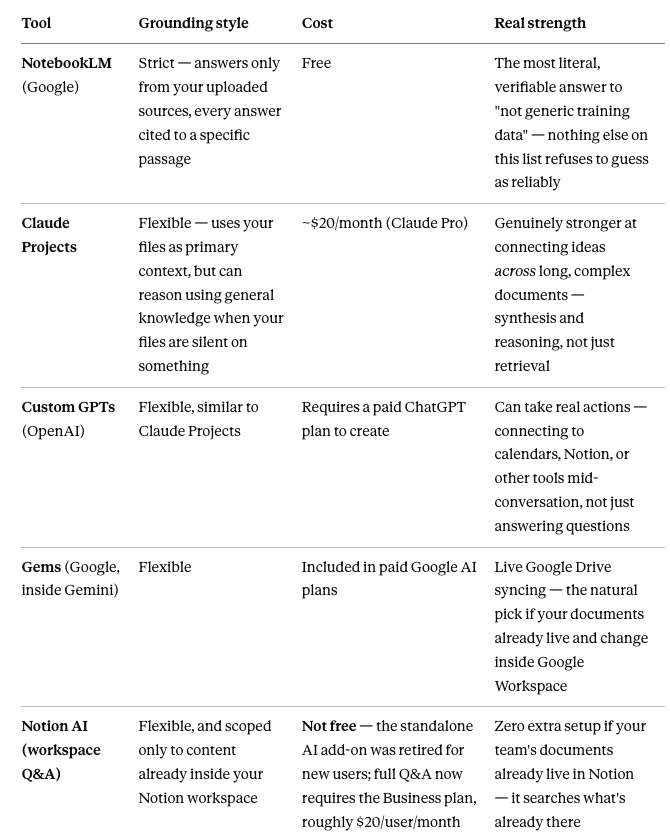
These aren't worse tools — they're built for a different job. Strict grounding (NotebookLM) is what you want when the literal, sourced answer matters most — policy questions, compliance, anything where a confident wrong guess is genuinely costly. Flexible grounding is what you want when you need the AI to actually reason across your material, not just retrieve from it — connecting an idea in one document to a related one in another. Given this course's specific goal — "not generic training data" — NotebookLM is the direct match and the free one, which is why it's the starting recommendation. But know the other four aren't consolation prizes; they're the right call for a different, equally real job.
Isn't this just pasting a PDF into a chat?

Pasting a document into a normal chat does give the AI that content as context — for that one conversation. Three things it doesn't give you, which a dedicated tool does:
It doesn't persist. Close the chat, and you're re-uploading the document next time. A grounded tool keeps your sources loaded permanently — upload once, ask forever.
It doesn't scale past one or two documents comfortably. Try pasting five or six real files into a chat and the conversation gets unwieldy fast, competing for space in the same context window as everything else you're discussing.
Critically: pasting a PDF into a normal chat doesn't actually enforce strict grounding either. The model still has all its general training available and will blend it in exactly the way Section 2 described — even with your document sitting right there. Only a tool specifically built to restrict answers to your sources (NotebookLM being the clearest example) genuinely closes that gap. Pasting a file into a regular chat is closer to Claude Projects' flexible style than to real, strict grounding — worth knowing before you assume an ad-hoc paste is doing more than it actually is.
Other ways to use this

The company-policy assistant in Section 8 is one example. The same underlying idea — upload your real material, get answers grounded in it — applies well beyond that:
A personal research assistant. Upload a stack of papers, articles, or your own notes on a topic you're studying, and ask questions across all of them at once.
A single-contract reviewer. Upload one specific contract or legal document, and ask pointed questions scoped only to that document — useful precisely because it won't blend in generic legal assumptions from elsewhere.
A meeting-history assistant. Upload several months of meeting notes, and ask "what did we actually decide about X" instead of scrolling back through old documents yourself.
A new-hire onboarding assistant. Upload your real internal handbook, process docs, and team norms — new hires get consistent, sourced answers without repeatedly asking the same person the same questions.
A product-knowledge assistant for a sales or support team. Ground it in your actual product documentation and case studies, so answers reflect what your product actually does — not a plausible-sounding guess.
A study companion for a specific course or textbook. Upload the actual course material, and get answers and quizzing scoped to exactly what you're being tested on.
The pattern behind all of them is the same: whenever "confidently wrong" would be worse than "correctly uncertain," grounding to your real material is the right tool for the job.
What to actually consider before uploading anything

Quality over quantity. A handful of the documents people actually ask questions about — a handbook, an FAQ, a policy doc — outperforms dumping in everything you have. A confused, disorganized source set produces a confused, disorganized assistant.
Know the format limits. Most tools cap individual sources around 500,000 words or 200MB, and copy-protected PDFs typically won't import at all — worth checking a document opens cleanly before assuming it will.
Think before you upload anything sensitive. Every mainstream tool covered here processes your files in the cloud. Don't upload anything containing real client data, financial specifics, or anything your company would consider confidential without checking your organization's actual policy first — the same caution that applies to every AI tool in this catalog holds here too, and arguably matters more, since you're uploading whole documents rather than describing a snippet.
It won't stay current on its own. Update your company's actual policy, and the assistant still has the old version until you re-upload it. This isn't a live connection to your real, changing documents — it's a snapshot, as current as your last upload.
How long this actually takes, and what you need first

The tool setup itself: under ten minutes, across every option in Section 3. Create a project or notebook, upload your files, done — no coding, no configuration most people would recognize as technical.
The real time investment isn't technical — it's curation. Deciding which documents actually answer the questions people ask, and testing that the assistant gives correct, groundable answers rather than confident-sounding guesses (Section 8) — that's genuinely worth an hour of real attention, not the ten-minute setup people usually picture.
What you need before starting: it depends on the tool, but never code. NotebookLM needs nothing — free, works with a standard Google account. Claude Projects, Custom GPTs, Gems, and Notion AI all require a paid plan on that specific platform, but never an API key, developer account, or coding setup — any payment involved is simply for the platform itself.
Build and test one today

The example: a Company Policy Assistant.
Gather 2–4 real documents — an employee handbook, an FAQ, a benefits summary, whatever your team actually gets asked about most.
Open NotebookLM (or your chosen tool from Section 3) and upload them.
Ask it something you know the real answer to — "How many sick days do employees get?" Check the answer against the actual document. Does it match, and does it cite the right source?
Now run the real test: ask it something deliberately NOT in your documents — something plausible-sounding but genuinely absent, like a policy you know isn't covered. A properly grounded assistant should tell you it doesn't know — not confidently invent an answer. This is the single most important check in this entire course. If it invents an answer instead of admitting the gap, that's the tool (or your source set) failing the one job this course is actually about.
Share it, if the tool allows it, so your team gets the same grounded answers instead of asking you the same question repeatedly.
The honest limits

Grounding isn't a perfect guarantee, even on the strict tools. Occasionally an answer can still drift or misread a source — the Section 8 test isn't a one-time setup step, it's a habit worth repeating whenever the stakes are high.
Garbage in, garbage out still applies. A disorganized, outdated, or contradictory source set produces a disorganized, outdated, or contradictory assistant — no tool fixes bad source material.
It's a snapshot, not a live feed. Nothing here updates automatically when your real documents change.
Nexa's Verdict: Hype 2/5 · Maturity 5/5 — genuinely one of the most reliably useful, least hyped applications in this catalog. The setup is trivial; the discipline of testing it properly is the entire skill worth taking away.
What you now know
Grounding means an AI answers only from documents you gave it — not its general training. This is the concept that makes "an AI that knows our stuff" actually true.
Tools trade off differently, not better or worse — NotebookLM is the strictest and free; Claude Projects, Custom GPTs, Gems, and Notion AI are more flexible and each strong at something different.
Pasting a file into a normal chat gives temporary context, but doesn't enforce real grounding the way a dedicated tool does — and doesn't persist between conversations.
This same idea applies far beyond company policy — research, contracts, meeting history, onboarding, product knowledge, and studying all fit the same pattern.
Setup takes under ten minutes with no coding; the real time investment is curating sources and testing properly.
Always test with a question deliberately outside your documents — a properly grounded assistant says "I don't know" instead of inventing an answer.
NotebookLM also turns documents into a listenable podcast-style summary, and can hold up to 50 mixed-format sources at once — genuinely useful beyond simple Q&A.
Nice work — you've finished the reading
Ready to lock it in? Take the quick quiz and earn your free certificate.
Back to GMAsia Campus